
How Do Discord Timestamps Work? The short answer
A Discord timestamp is a small piece of message markup such as <t:1788735600:F>. The number identifies an instant using Unix time, while the final letter tells Discord how to format that instant. If the suffix is omitted, Discord uses its default date-and-time style.
When someone reads the message, Discord interprets the number, checks the reader's locale and time-zone settings, and displays a familiar local date or time. The organizer shares one value instead of writing a separate conversion for each location.
The important idea is that the timestamp represents the event itself, not the appearance of the event on one person's clock. The same event can look like 7:00 PM for one member and 1:00 AM the next day for another while still pointing to the same moment. If you only need a ready-to-paste code, use the Discord timestamp generator; the rest of this guide explains what it is doing.
The three pieces of a Discord timestamp
The syntax is easier to understand when it is separated into its jobs. In <t:1788735600:F>, the opening and closing characters tell Discord that a timestamp token is present. The number is the shared instant. The optional suffix is only a presentation request.
This separation prevents a common misunderstanding: changing F to R does not move the event. It changes a full calendar display into a relative phrase such as “in 2 hours” or “2 hours ago.” The underlying Unix seconds remain the same until the event time itself changes.
- The wrapper:
<t:...>marks the value as a Discord timestamp. - The Unix seconds: a number that identifies one instant relative to the Unix epoch.
- The suffix: an optional style such as
F,d, orR. - The viewer's settings: Discord uses them when it renders the same instant locally.
How local time becomes Unix seconds
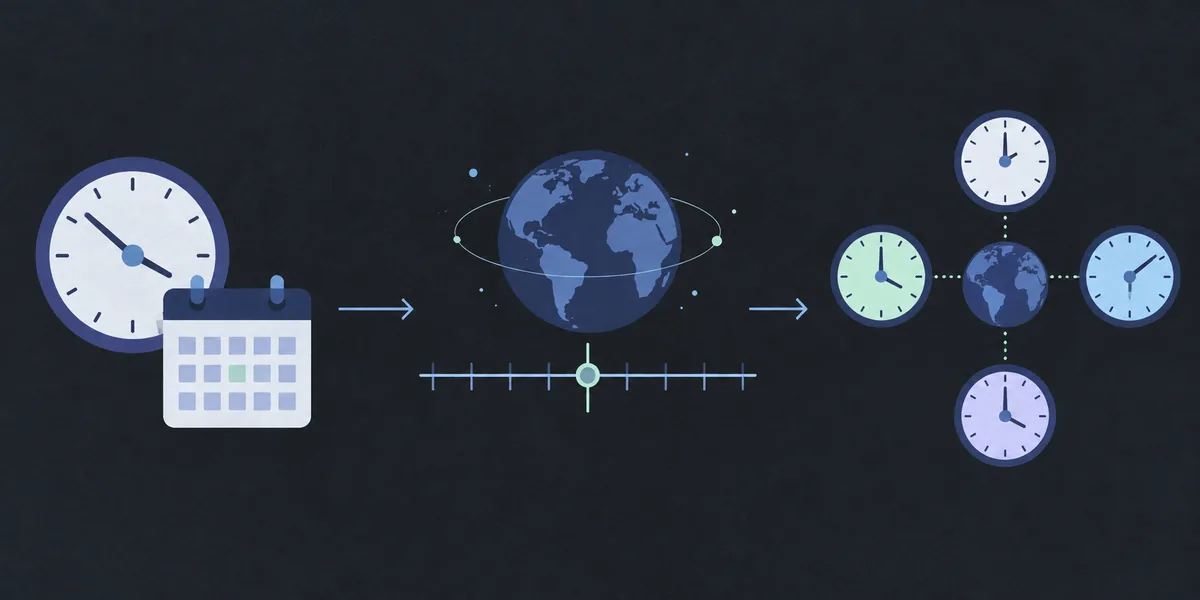
A person usually starts with a wall-clock instruction: “September 6, 2026 at 7:00 PM in New York.” A computer needs a more stable representation than a clock label, because that label is incomplete without a date and a time zone. The conversion therefore follows a short chain from a local date and time to one universal instant.
The selected IANA time zone matters because it carries the region's offset rules, including daylight-saving changes. A fixed abbreviation such as EST or CET can be ambiguous, while a named zone such as America/New_York tells the calculator which rules to apply on that particular date.
1. Start with a complete local date and time
The input needs three facts: a calendar date, a clock time, and the time zone where that local time occurs. For example, 19:00 in America/New_York on September 6, 2026 is not just the text “19:00.” It is a specific regional clock reading on a specific day. Leaving out the zone can shift the result by hours.
2. Resolve the instant and count Unix seconds
The calculator resolves the local clock reading to UTC, then counts whole seconds from January 1, 1970 at 00:00:00 UTC. For the example above, the result is 1788735600. This number is not a formatted date and it is not a time-zone offset; it is an identifier for the instant on a shared timeline.
3. Wrap the number in Discord syntax
Finally, the number is placed inside a timestamp token. The long date-and-time version becomes <t:1788735600:F>. Discord can now decide how that instant should look for each reader. Copying the token into a message is enough; you do not need to calculate a second code for every participant.
Why viewers see different clock times
Discord can render a timestamp in the time zone configured for the person viewing the message. Imagine an organizer creates a timestamp for a meeting at 19:00 in New York. A member in London may see the same meeting at midnight, while a member in Tokyo may see it in the morning of the following calendar day. Those displays differ, but the Unix number does not.
This is why a Discord timestamp is usually better for an international event than writing “7 PM EST.” A manually typed abbreviation asks every reader to remember or look up the conversion. A timestamp carries the instant once and lets Discord handle the local presentation at read time.
What the format suffix changes
The suffix is a presentation choice. Choose a style based on what the reader needs to scan: a precise clock time, a calendar date, a complete event line, or a relative countdown. The token still points to one instant in every case.
| Style | Suffix | What it is for | Typical use |
|---|---|---|---|
| Short time | t |
Hour and minute | Compact event time |
| Short date | d |
Compact numeric date | Deadlines and dates |
| Short date and time | f |
Date plus compact time | Everyday announcements |
| Long date and time | F |
Weekday, date, and time | Complete event notices |
| Relative | R |
Time from now | Reminders and countdowns |
Common Discord timestamp mistakes
Most errors come from the input context rather than the Discord syntax. If the code looks correct but the event appears at the wrong hour, revisit the source time zone and the date before changing the suffix. A display style cannot repair an incorrect instant.
These checks are especially useful for recurring community events, release countdowns, and meetings close to midnight. Read the code as data: one date, one local time, one named zone, and one Unix-second result.
- Using your current time zone instead of the time zone where the event is scheduled.
- Typing EST, PST, or another abbreviation without checking whether it is the intended seasonal offset.
- Treating the Unix number as milliseconds. Discord timestamp syntax uses Unix seconds, not a thirteen-digit JavaScript millisecond value.
- Forgetting that a time near midnight may become the next calendar day for another viewer.
- Ignoring daylight-saving transitions, where a local clock time may be skipped or occur twice.
A practical workflow for international events
For a real event, decide which location owns the schedule first. If a host says a stream begins at 8:00 PM in Los Angeles, select America/Los_Angeles even when you are creating the post from another country. The host's local time is the input; the readers' local times are the output. Then use the homepage generator to check the number and choose a readable style.
- Write down the event date, local clock time, and source IANA time zone.
- Generate the Unix seconds and compare the displayed preview with the intended source time.
- Copy one or more styles into the message; do not manually edit the number.
- After posting, ask a member in another time zone to confirm the local rendering if the event is high stakes.
Limits, previews, and privacy
A Discord timestamp is a formatting feature, not a scheduling service. It gives Discord a precise moment to render in a message, but it does not send reminders, create calendar invitations, change server permissions, or guarantee that a member will be online.
The Timestamp Tools generator performs the conversion in your browser. It does not need a Discord login, an API key, or access to a server. A share link can include the date, time, and selected zone so the same input can be reopened; it does not need your message, username, or private server details.
There are also browser and client boundaries. The page can explain the intended local preview, but Discord's final wording depends on the reader's locale and client. During a daylight-saving gap, the entered local time may not exist; during a repeated hour, there can be two valid instants. A trustworthy generator should explain those cases instead of silently choosing a surprising offset.
COMMON QUESTIONS
Discord timestamp questions, answered
What is a Discord timestamp?
It is a token such as <t:1788735600:F> that Discord converts into a readable date or time. The Unix seconds identify one instant, and the optional suffix selects the display style.
Why does the same Discord timestamp show different times?
Discord can render the same Unix instant in each reader's local time zone. Different clock labels are expected as long as they refer to the same event moment.
Do Discord timestamps use seconds or milliseconds?
They use Unix seconds. A JavaScript millisecond value is usually thirteen digits and should be divided by 1,000 before it is placed in a Discord timestamp token.
Which time zone should I choose when creating a timestamp?
Choose the IANA time zone that describes the event's source local time, such as America/New_York or Europe/London. Your own location is not automatically the correct source zone.
Can a Discord timestamp handle daylight-saving time?
The named time zone provides the rules needed for daylight-saving changes. A local time can still be skipped or repeated during a transition, so check the generator's warning and choose the intended valid occurrence.
Does a Discord timestamp create a reminder?
No. It only formats an instant inside a message. It does not schedule notifications, create an event, or contact a Discord account.
REFERENCE
Technical reference
- Discord developer referenceDiscord's official developer documentation for message formatting and timestamp styles.
- Discord Timestamp Generator by 3v.fiA public reference tool that demonstrates copy-ready Discord timestamp syntax.